LLM 유용 함수 모음
추천글 : 【Python】 파이썬 유용 함수 모음, 【알고리즘】 21강. NLP와 LLM
1. 자연어 처리 유용 함수 [본문]
2. LLM 응용 [본문]
3. LLM 에이전트 [본문]
4. AI Scientist [본문]
1. 자연어 처리 유용 함수 [목차]
⑴ 주어진 문장을 자동으로 영어로 번역하는 함수
! pip install --upgrade googletrans httpx httpcore deep_translator

def to_english (sentence):
    from deep_translator import GoogleTranslator
    translated = GoogleTranslator(source='auto', target='en').translate(sentence)
    return translated

print( to_english("나는 소년입니다.") )
# I am a boy.

print( to_english("단핵구") )
# monocytes
⑵ 주어진 문장을 자동으로 한국어로 번역하는 함수
def to_korean (sentence):
    from deep_translator import GoogleTranslator
    translated = GoogleTranslator(source='auto', target='ko').translate(sentence)
    return translated

print( to_korean("I am a boy.") )
# 저는 남자입니다.
⑶ 주어진 문장을 자동으로 일본어로 번역하는 함수
def to_japanese (sentence):
    from deep_translator import GoogleTranslator
    translated = GoogleTranslator(source='auto', target='ja').translate(sentence)
    return translated

print( to_japanese("I am a boy.") )
# 私は男の子です。
⑸ 임의의 가변 길이 자연어 문장을 그 의미를 고려하여 384차원으로 만드는 함수 (cf. CELLama)
from langchain.embeddings.sentence_transformer import SentenceTransformerEmbeddings
import numpy as np
from scipy.sparse import csr_matrix
import pandas as pd
from sklearn.neighbors import NearestNeighbors
import torch
from torch.utils.data import DataLoader, TensorDataset
from xgboost import XGBClassifier

def sentences_to_embedding(sentences):
    embedding_function = SentenceTransformerEmbeddings(model_name="all-MiniLM-L6-v2")
    db = embedding_function.embed_documents(sentences)
    emb_res = np.asarray(db)
    return emb_res


sentences = []
sentences.append("What is the meaning of: obsolete")
sentences.append("What is the meaning of: old-fashioned")
sentences.append("What is the meaning of: demagogue")
emb_res = sentences_to_embedding(sentences)
2. LLM 응용 [목차]
⑴ ollama.ai (무료) : Llama2/3/4, Phi-3, Mistral, Gemma, etc
⑵ GroqChat (무료) : Mixtral, Llama3, Gemma
⑶ OpenRouter (유료) : ChatGPT API 등 사용 가능
⑷ Llama2 (무료)를 이용한 영한 번역
import ollama

def english_to_korean(sentence):
    content = 'Translate "' + sentence + '" to Korean. Output only the translated sentence.'
    response = ollama.chat(model='llama2', messages=[
      {
        'role': 'user',
        'content': content,
      },
    ])
    return response['message']['content']

sentence = "I am a boy."
english_to_korean(sentence)
⑸ 주어진 문장이 화학식을 포함하는지 판단하기
import ollama

def is_chemical_formula(sentence):
    content = 'Please determine if "' + sentence + '" contains a chemical formula or not. If it is correct, answer "sure"; otherwise, "no".'
    response = ollama.chat(model='llama2', messages=[
      {
        'role': 'user',
        'content': content,
      },
    ])
    return response['message']['content']

sentence = "NH2OH is an amine."
result = is_chemical_formula(sentence)
print(result)
print('sure' in result.lower())

sentence = "I am a boy."
result = is_chemical_formula(sentence)
print(result)
print('sure' in result.lower())

### Output ###
'''
The term "NH2OH" does contain a chemical formula, so the answer is "yes" or "sure".
True
The statement "I am a boy" does not contain any chemical formulas, so the answer is "no".
False
'''
⑹ 주어진 명사가 고유명사(proper noun)인지 보통명사(common noun)인지를 판단하기
import ollama

def is_proper_noun(noun):
    content = 'Please determine if "' + noun + '" is a proper noun or common noun. If it is a proper noun, answer "proper"; otherwise, "common".'
    response = ollama.chat(model='llama2', messages=[
      {
        'role': 'user',
        'content': content,
      },
    ])
    return response['message']['content']

sentence = "Pencil"
result = is_proper_noun(sentence)
print(result)
print('proper' in result.lower())

sentence = "Feynman"
result = is_proper_noun(sentence)
print(result)
print('proper' in result.lower())

### Output ###
'''
"Pencil" is a common noun. Therefore, the answer is "common".
False

"Feynman" is a proper noun. Therefore, the answer is "proper".
True
'''
3. LLM 에이전트(LLM agent) [목차]
⑴ 개요 : 2026년은 LLM agent의 해
⑵ OpenClaw (clawd.bot)
① 개인 개발자 Peter Steinberger(steipete)가 만든 오픈소스 프로젝트
② Anthropic이 상표권 이슈로 이름을 바꿔달라고 요청해서 Moltbot → OpenClaw로 리브랜딩
⑶ Claude Code
① Anthropic이 만든 LLM 기반 에이전틱 코딩 툴. 세부 모델은 Haiku (빠름), Sonnet (밸런스), Opus (고성능)
② 설정 방법
○ 단계 1. Antigravity 설치
○ 단계 2. 설치 후 최초 실행 시 설정 (ref)
○ 단계 3. Google 계정 로그인
○ 단계 4. Antigravity 접속 후 Market Place에서 Python 3개 및 Claude Code 다운로드
○ 단계 5. Antigravity 재접속
○ 단계 6. 워크스페이스 연결
○ 단계 7. 터미널에서 claude 치고 Google 계정 연결
③ 유용한 스킬(skill) (ref1, ref2, ref3, ref4, ref5)
⑷ ChatGPT Pro
⑸ 구글 생태계
① 모델 : Gemini, Gemma
② 리서치 : NotebookLM
③ 디자인 : Stitch (텍스트 → UI), Whisk (이미지 시각화)
④ 텍스트 → 비디오 : Veo, Google Vids
⑤ 코딩 : Antigravity (AI 기반 IDE), Jules (코딩 비서)
⑥ 에이전트 (위 모든 도구를 연결) : A2A, ADK
4. AI Scientist [목차]
⑴ 개요 : `인지의 지평선과 AI라는 돌파구`
⑵ FunSearch
⑷ The AI Scientist (Sakana AI, Nature (2026))
⑹ The Virtual Lab (유튜브 강연), The Virtual Biotech
⑺ AI-Descartes : 기호적 추론으로 케플러 제3법칙 도출
⑼ CodeScientist (Jansen et al., 2025)
⑽ AgentLab (Schmidgall et al., 2025)
⑾ Popper (Huang et al., 2025)
⑿ HypoBench (Liu et al., 2025)
⒀ AutoDiscovery : 베타분포를 이용한 uncertain (surprisal) measure로 창의적인 가설을 생성하는 모델
⒃ Kosmos
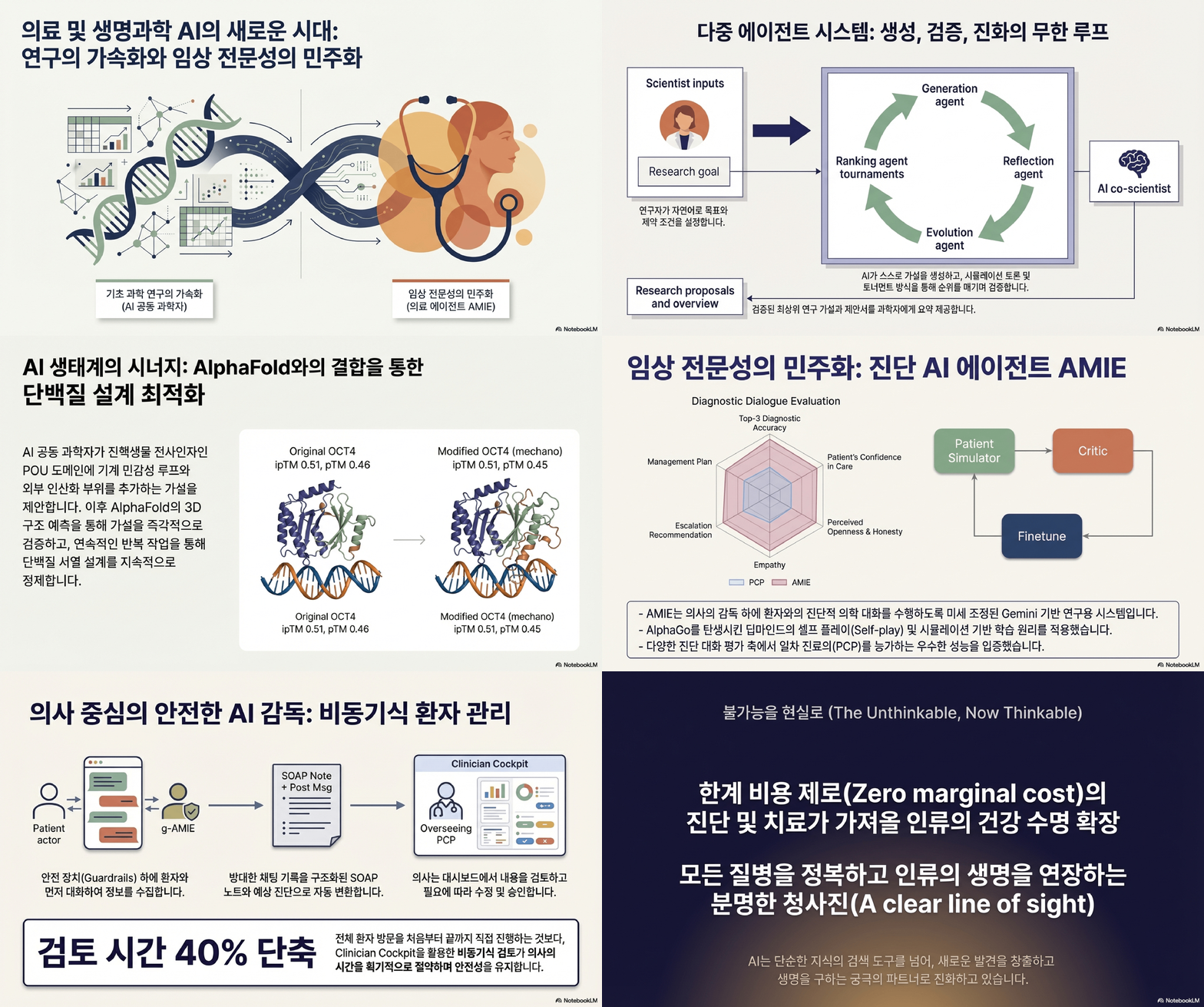
⒄ Google medical AI 생태계
입력: 2024.02.10 13:34
수정: 2026.01.29 00:43
'▶ 자연과학 > ▷ Python' 카테고리의 다른 글
| 【Python】 파이썬 주요 트러블슈팅 [81-100] (6) | 2024.06.07 |
|---|---|
| 【Python】 파이썬에서 R 실행하기 (2) | 2024.04.30 |
| 【Python】 파이썬 앱 라이브러리 (0) | 2023.11.15 |
| 【Python】 MinIO 유용 함수 모음 (0) | 2023.08.20 |
| 【Python】 파이썬 주요 트러블슈팅 [61-80] (0) | 2023.08.17 |
최근댓글